Is NotebookLM enough? Wiring it into Claude Code
Why bother when a ready-made tool exists? Where NotebookLM shines, where the wiki does — and the MCP bridge that joins them.
The busiest question under my first memory video was this: "Why would I build this system when Google's ready-made tool, NotebookLM, already exists?" This part of the series gives that question an honest answer.
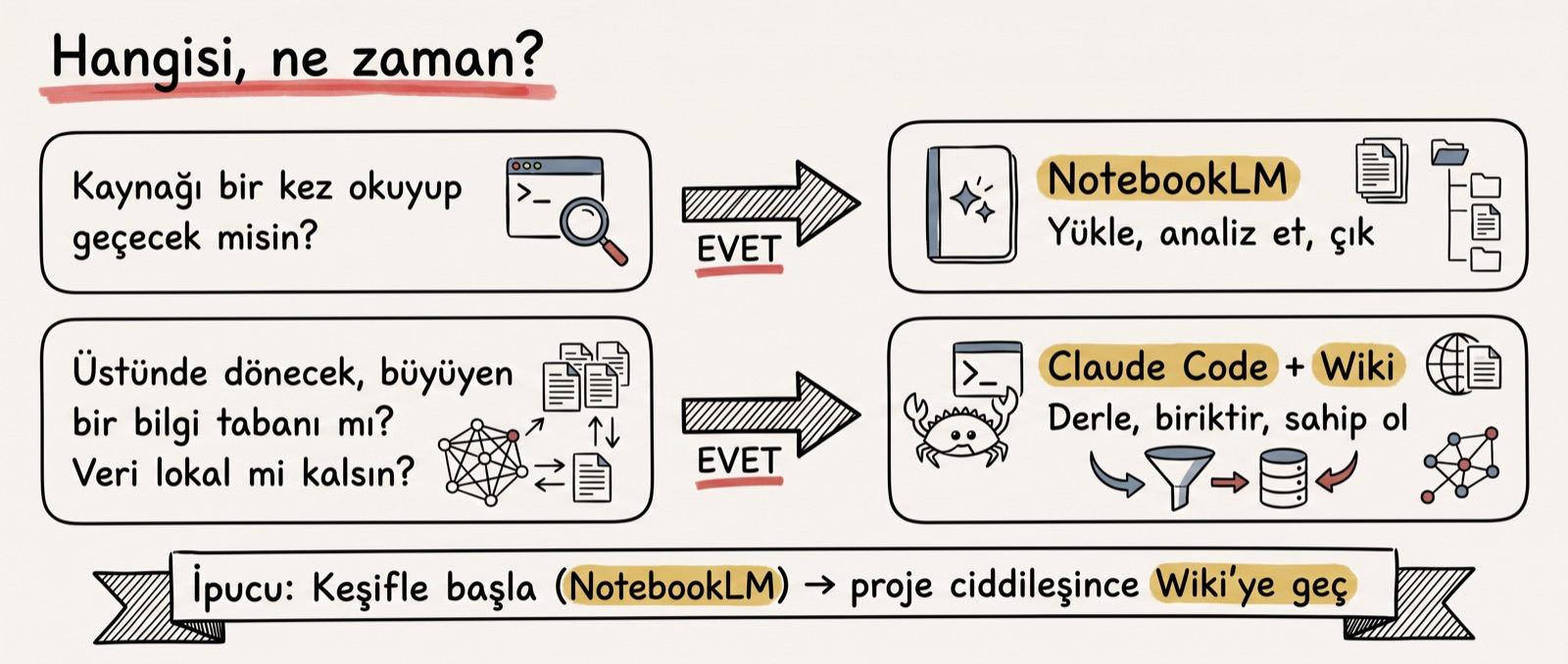
The question is genuinely fair. For four parts I've been talking about markdown files, an index, wikilinks and lint; NotebookLM works the moment you upload a source. No setup, no prompts, no CLAUDE.md.
That's why, in the fifth chapter of the video, I ran the comparison from scratch with a brand-new Google account. I tried both sides on the same project, with my own files. This piece is that chapter in written form.
Three things follow: the division of labour between the two, where each one shines, and what the MCP bridge between NotebookLM and Claude Code actually buys you.
The division of labour: does it think at query time, or at compile time?
What NotebookLM does is fundamentally simple: you upload your sources, and the Gemini behind it answers based only on those sources. The chat isn't free-form, it's bound to the sources; the tool builds every answer from the files you uploaded. You ask for a summary, a report, flashcards, a data table — and it all arrives in a few clicks. Google renamed the tool Gemini Notebook in July 2026; to stay consistent with the video, I'll keep calling it NotebookLM.
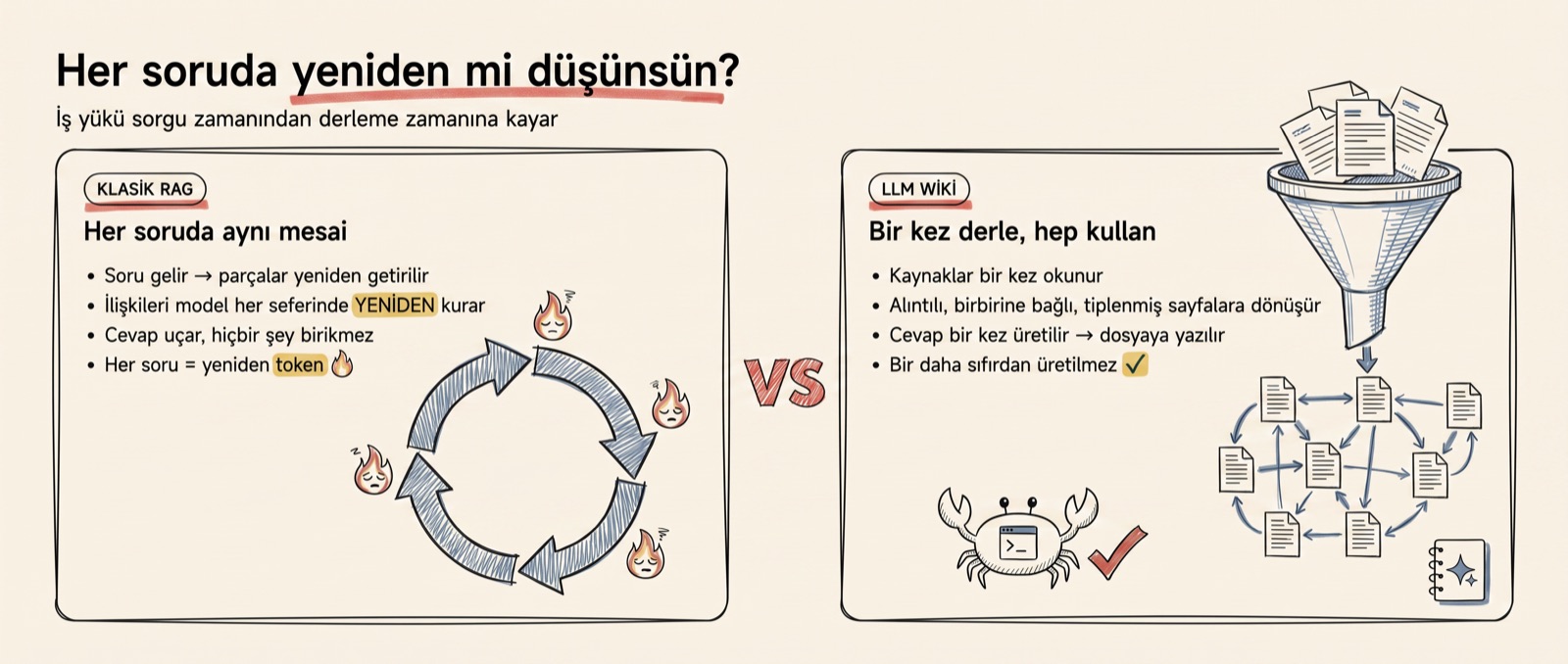
The LLM wiki, on the other hand, is not a single product but a pattern Karpathy put forward. It gets implemented both as a desktop app and as an MCP server. The shared idea is to shift the workload from query time to compile time. Classic RAG retrieves the relevant chunks on every question and makes the model rebuild the relationships each time; the wiki reads the sources once and turns them into cited, interlinked pages. An answer is produced once, written to a file, and never generated from scratch when the same question comes back.
Let's not leave that distinction on paper; in practice, where each one shines separates very cleanly.
Where NotebookLM shines: upload and collect
Zero setup is its biggest strength. You drag your file in; there's no need to link files to each other or to write prompts for it. It's a perfect tool for quickly analysing a small dataset, scanning sources you'll read once and move on from, and starting a new topic with exploration.
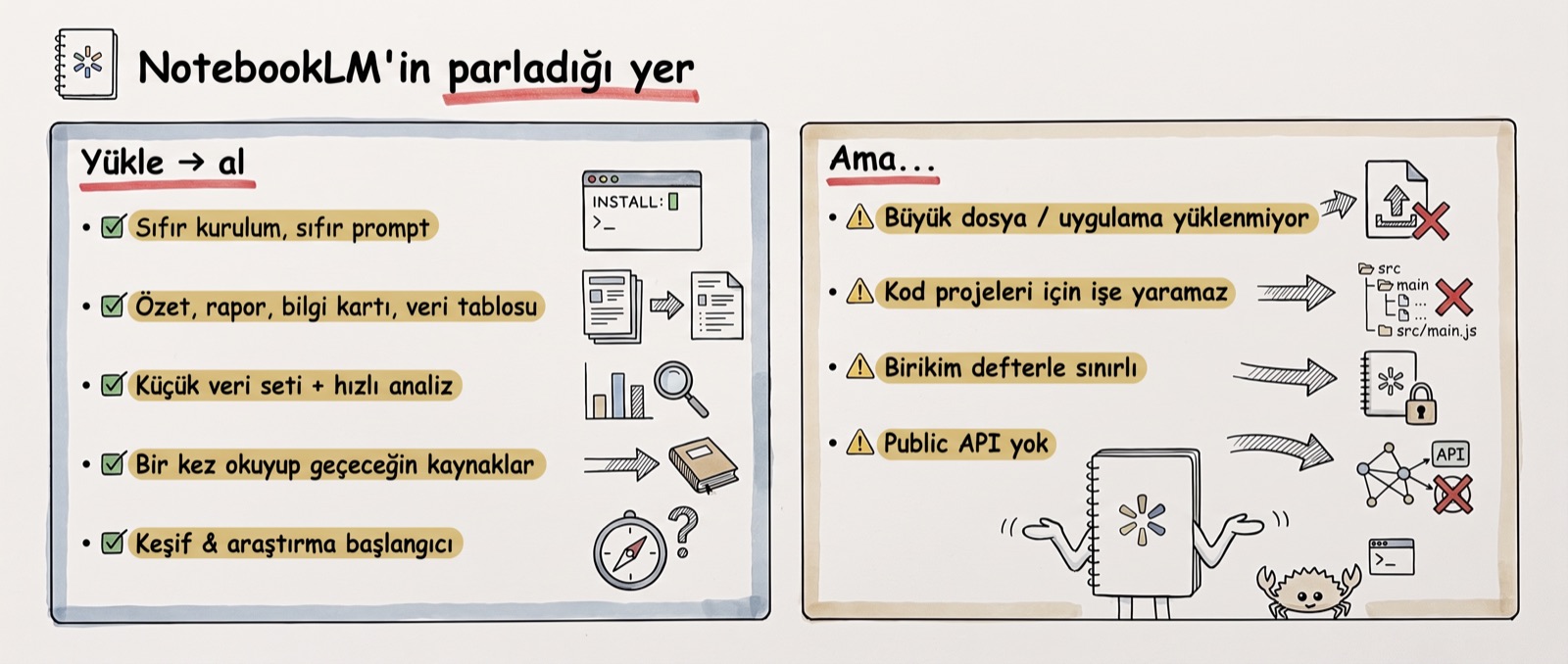
In the demo I tested this with my own files. I uploaded the design and database files from the pixel adventure game in my previous video; the tool produced a source guide, wrote a summary, and generated a data table with columns for file path, purpose and text content. The notes I added were saved into the notebook too. Getting that much work for zero setup is genuinely impressive.
The limits surface just as quickly. I couldn't drop the game's project folder in as-is; I had to pick the files one by one. Large files don't go in at once, and for code projects it's frankly useless.
The ceilings of the free tier are clear too: 100 notebooks, 50 sources per notebook, 500,000 words per source, 50 chat queries per day. Those numbers come from Google's own support page. The tool itself can be tried for free at notebooklm.google.com.
So what does the system we've been building for four parts do better?
Where the wiki shines: a system you own, and that accumulates
You own the output. Your markdown files sit on your own disk; you version them with Git, view them with Obsidian, and when you want to switch to another tool you take the files with you as they are.
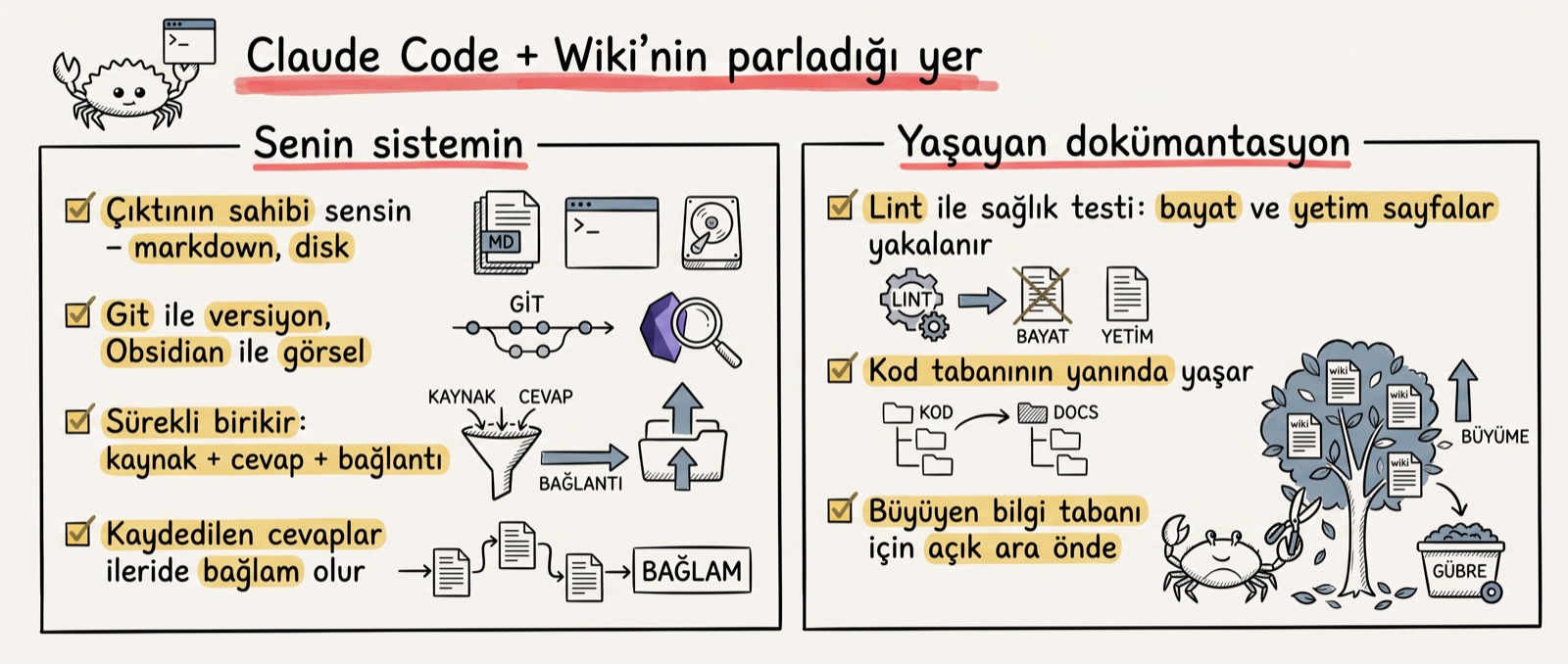
The second strength is accumulation. Your sources, your answers and the links between them get updated every session; every saved answer becomes context later. NotebookLM has a similar record, but a limited one. On top of that, a lint pass lets you spot pages that have gone stale or ended up orphaned. If you want documentation that lives alongside your codebase, this system is ahead by a wide margin.
The fastest way to see the ownership gap is the data-export test. In NotebookLM your sources live in Google's cloud; built-in export is limited to Google Docs, Google Sheets and an audio file. No markdown export, no downloading your chat history. In the vault there's nothing to export, because the data already sits on your disk as markdown.
To be honest, this freedom has a price — and it's a price NotebookLM doesn't pay.
The wiki's dark side: a mistake written to disk becomes permanent
In RAG, a hallucination evaporates; in the wiki, it gets written to disk. A wrongly written page stays in the file, new pages get built on top of it, and as the graph grows the mistake becomes invisible. The wiki looks correct to you, but drift may have been accumulating underneath.
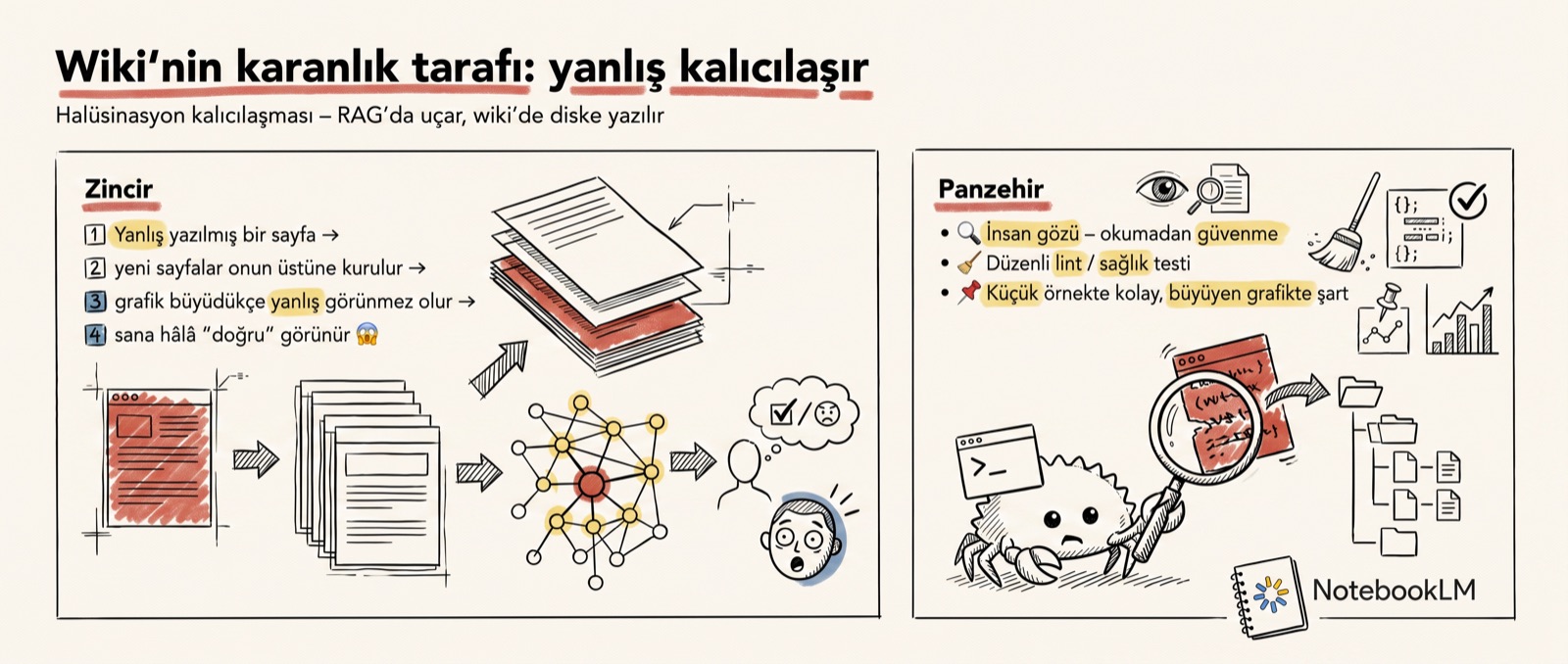
NotebookLM doesn't have this problem. Because the answers are grounded in the sources every single time, the tool maintains that discipline for you behind the scenes. On our side, the antidote is human eyes and regular lint. My example in the video is a small vault; as the graph grows, this health check stops being a preference and becomes a requirement.
Stack the pros and cons and the decision comes down to a single question.
The decision: will you read it once, or keep coming back?
If you'll read a source once and move on, NotebookLM is enough: upload, analyse, leave. If you're building a growing knowledge base you'll keep circling back to, and you want the data to stay local, you move to the wiki side with Claude Code.
That's my summary in the video too: use NotebookLM first for exploration and research; when the project gets serious and you want more thorough, freer work, move to the wiki. They're not rivals — they're two stops on the same road.
Add the Obsidian of part 4 and the map is complete. Obsidian is just the viewing layer; NotebookLM is a hosted machine layer, but a closed one; the vault with Claude Code is the machine layer you own. Three tools answering the same question from different places.
One question remains: does it make sense to wire the two together?
The MCP bridge: the cable exists — but is it needed?
You can connect Claude Code to NotebookLM over MCP; there's a ready-made package on npm: notebooklm-mcp.
I did this setup in the video: I added the MCP server to Claude Code, restarted Claude, and saw it connect to my account. From that point on, Claude could ask questions of the files inside my notebook.
The gain is here: if the answer is spread across 40 files, instead of reading those 40 files one by one, Claude tells NotebookLM "I need this information" and gets a single synthesised answer back. The bridge returns not the raw document but the answer Gemini has synthesised. A file diet, of sorts.
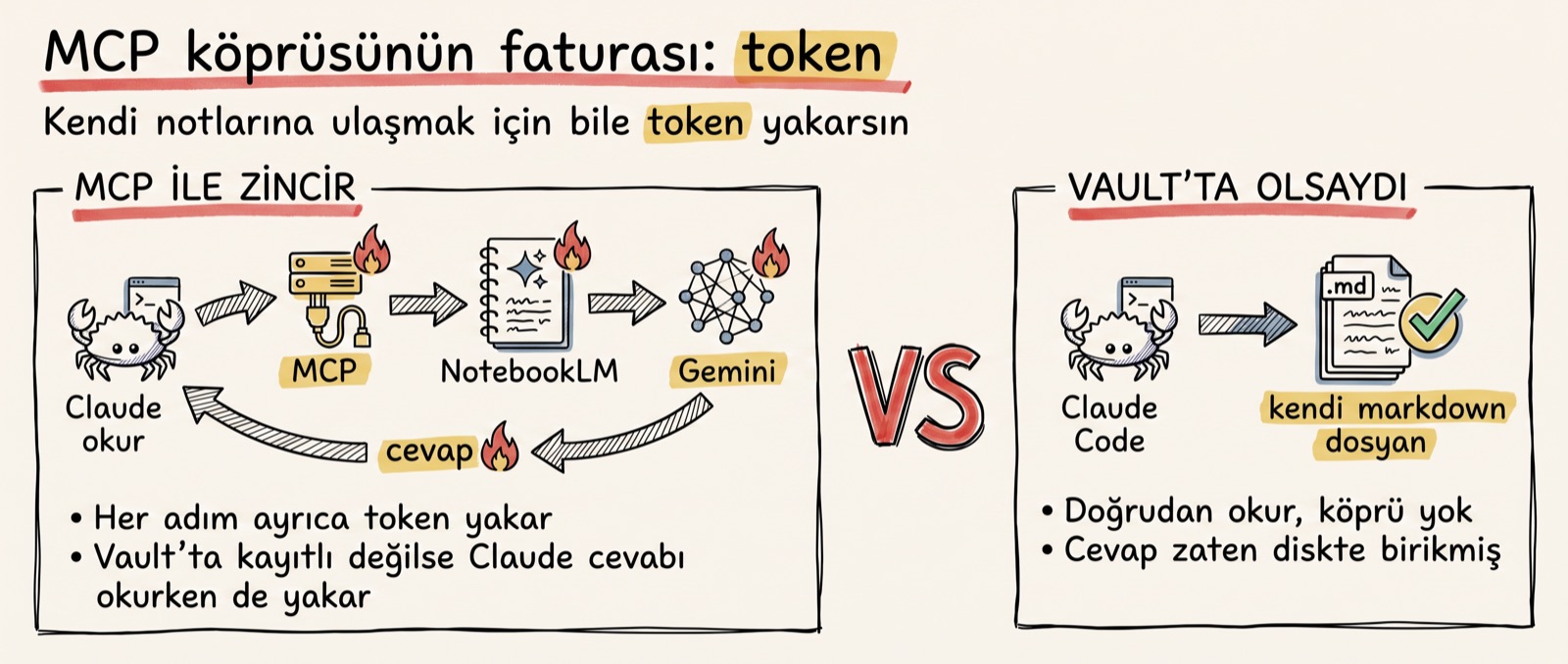
There's a bill too. Every MCP call burns extra tokens; you pay tokens just to reach your own notes. And if the information you uploaded doesn't also sit locally as a vault, Claude burns tokens once more while reading the answer that comes back.
There's also a vicious circle I see often: you upload the information to NotebookLM first, then wire it back into Claude Code over MCP, and ask Gemini about information Claude already has access to. In the video I used a single word for this: pointless. In my scenario the bridge is unnecessary, because everything I have is already local and, in a properly built vault, Claude doesn't need to read 40 files. For someone whose data genuinely lives in NotebookLM, though, the bridge is a real gain.
I see three sensible uses: pushing local files into NotebookLM over MCP, having Gemini do the analysis from the interface, and separating note types — keeping written notes in NotebookLM and code projects in the wiki.
Try it yourself — a three-step test
- Upload your latest pile of sources (PDFs, articles, meeting notes) to NotebookLM; get a summary, flashcards and a data table.
- For one week, note how many times you return to the same topic. If you never returned, you were in the right tool; close the notebook and move on.
- On the third return, that topic is now a wiki candidate: move the files into the vault as markdown, add a single line to the
index, and have the agent build the links.
This test is my decision rule put into practice: consumption stays in NotebookLM, accumulation moves to the vault.
So: the question isn't "which one is better" but "what will you do with this knowledge". If you'll read it once, open the ready-made tool; if you'll accumulate, build the system. I didn't make this comparison by looking at systems on X — I tried both sides on my own project, and even opened the demo account from scratch so the result wouldn't be inflated by old data.
The next part is the finale of the series: Hermes, an agent that manages its own memory. After every turn it audits itself and writes what it learned to its own disk without being told. Remember the write path from the start of the series — in Hermes, that path runs as a trigger.